If you are searching for a practical Nano Banana 2 guide, the short answer is this: Nano Banana 2 works best as an image-first planning model for AI video. It is especially strong for storyboard frames, first-frame prompts, real-location references, and low-cost keyframe testing before you spend credits on motion.
Nano Banana 2 is one of the most interesting image models for AI video creators right now. It is fast, relatively affordable, and unusually practical for storyboard generation, first-frame ideation, last-frame planning, and real-location scene development.
This guide is an English practical adaptation of ideas discussed in a well-known X article by TanLuAI about Nano Banana 2 workflows, prompt structure, and model selection. Instead of translating that post directly, this article reframes the most useful takeaways for creators who want better AI video results and more search-friendly prompt workflows.
Nano Banana 2 at a Glance
- Best for: storyboard grids, keyframes, first-frame ideation, real-location scenes
- Main advantage: faster and cheaper iteration before video generation
- Best workflow: batch low-resolution frames first, then upscale the winner
- When to upgrade: move to Pro only after focused attempts still fail on fidelity or scene complexity
Why Nano Banana 2 Matters for AI Video Workflows
Many creators still think of image models as separate from AI video generation. In practice, image models are often the foundation of good video output.
For AI video creators, Nano Banana 2 is especially useful for:
- generating storyboard frames before spending more credits on video
- building strong first frames for image-to-video workflows
- testing multiple scene variations at lower cost
- creating cinematic multi-panel layouts for short films and ads
- generating realistic location references before motion is added
If your AI video process starts with a weak image, your final video usually inherits those weaknesses. That is why a model like Nano Banana 2 can improve the whole pipeline, not just the still image stage.
What Nano Banana 2 Does Better
Based on the practical use cases highlighted in the source article, Nano Banana 2 stands out in three areas that matter directly to video creators.
1. Real-World Scene Grounding
One of the most valuable ideas in the source article is using Nano Banana 2 for real-location reconstruction. Instead of asking for a generic beach road or a random European landmark, you can describe a real place and push the model toward more geographically grounded output.
This is useful for:
- AI film previsualization
- location scouting mockups
- historical or travel-style creative ads
- realism-first keyframes for image-to-video
Example image from the original article:
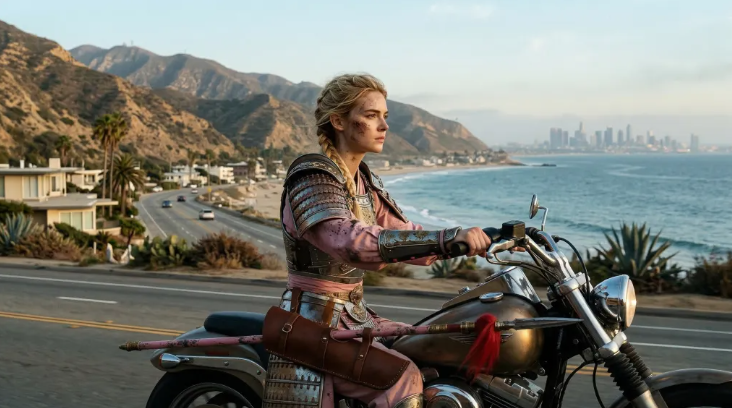
The practical lesson is simple: when realism matters, your prompt should describe not just the subject, but also the physical logic of the environment.
2. The 512px Batch-Then-Upscale Workflow
This is one of the smartest low-cost workflows for AI video production.
Instead of generating one expensive high-resolution image and hoping it works, the better sequence is:
- Generate many cheap low-resolution candidates
- Pick the strongest composition
- Refine that composition
- Upscale only the winner to 2K or 4K
- Use the approved image as your video source frame
This matters because video creators usually need:
- multiple first-frame candidates
- visual consistency between scenes
- a controllable approval step before animation
In other words, Nano Banana 2 is not just a “beautiful image” model. It is a screening model for better downstream video decisions.
Nano Banana 2 vs Nano Banana Pro
A lot of users ask the wrong question: “Which one is better?”
The better question is: “Which one should I use first?”
The workflow implied by the source article is pragmatic:
- Start with Nano Banana 2 for most storyboard, concept, and keyframe tasks
- Switch to Nano Banana Pro when fidelity, scene complexity, or multi-subject consistency becomes more demanding
Use Nano Banana 2 When You Need:
- rapid ideation
- multiple storyboard candidates
- strong cost efficiency
- unusual aspect ratios like 4:1, 1:4, or 1:8
- real-location experiments
Use Nano Banana Pro When You Need:
- more difficult composition control
- higher scene fidelity on the first try
- better multi-character or multi-object consistency
- more demanding wide shots or detail-sensitive environments
Here is the fastest way to think about Nano Banana 2 vs Pro:
| Workflow need | Start with Nano Banana 2 | Upgrade to Nano Banana Pro |
|---|---|---|
| Storyboard exploration | Yes | Rarely needed |
| First-frame testing | Yes | Only for harder shots |
| Real-location references | Yes | If scene accuracy still breaks |
| Product fidelity | Sometimes | Better when detail matters |
| Multi-character scenes | Limited | Better choice |
| Cost efficiency | Better | Higher cost, higher control ceiling |
The practical rule of thumb is:
Use Nano Banana 2 first. If you still cannot get a usable result after several focused attempts, then escalate to Pro.
That approach is better for both credits and creative speed.
A Prompt Structure That Works for AI Video Creators
One of the most helpful parts of the source article is the prompt structure. For English AI video workflows, this can be simplified into a highly reusable formula:
[Visual Style] + [Subject] + [Scene / Environment] + [Technical Direction] + [Special Constraints]1. Visual Style
This defines the creative language first.
Examples:
- cinematic realism
- luxury product commercial
- documentary street photography
- historical reimagination
- Franco-Belgian comic style
2. Subject
Describe the main subject clearly and early.
Examples:
- a woman in red hanfu
- a black laser distance meter
- a rider on a coastal highway
- a mischievous cat in a comic strip
3. Scene / Environment
This is where realism gets anchored.
Examples:
- a bright modern kitchen
- a bamboo forest at dawn
- inside Old St. Peter’s Basilica
- a Los Angeles coastal highway
4. Technical Direction
This is where video creators have an edge. You can specify:
- shot scale
- camera angle
- lens type
- composition
- motion readiness
Examples:
- medium close-up, side angle
- wide-angle lens, high angle
- 3x3 storyboard grid
- consistent framing across panels
5. Special Constraints
This is where you protect what matters most:
- keep the product shape consistent
- preserve character identity
- maintain object placement
- avoid messy text or deformed hands
This structure is ideal for AI video keyframes because it thinks like a director, not just like an illustrator.
Best Nano Banana 2 Prompt Formula for AI Video
If you want a repeatable Nano Banana 2 prompt formula, use this version:
[Style] + [Main Subject] + [Exact Scene] + [Camera / Framing] + [Lighting] + [Consistency Constraints] + [Video Use]Example:
Cinematic realism, a female rider on a Los Angeles coastal highway, medium close-up side angle, realistic ocean and mountain background, natural late-afternoon light, consistent anatomy and bike proportions, strong environmental accuracy, suitable as a first frame for image-to-video.This works better than vague prompts because it tells the model what the image is, where it happens, how it should be framed, and why the frame exists inside a later video workflow.
Best Nano Banana 2 Use Cases for AI Video Creators
Use Case 1: Storyboard Grids for Short Films and Ads
Nano Banana 2 is extremely useful for generating multi-panel scene boards before video production.
Example concept from the source article:
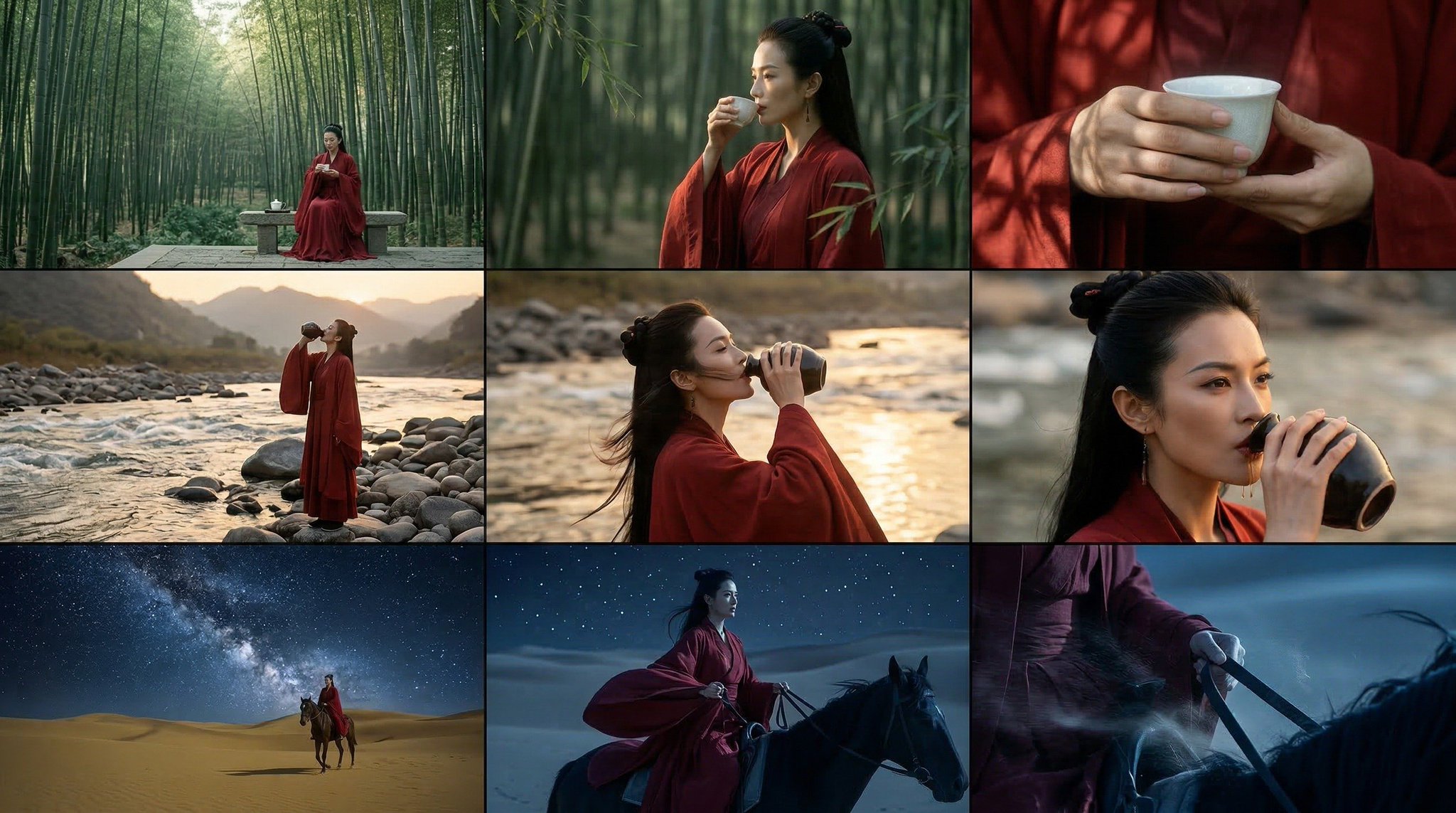
Why this works for AI video:
- you can define shot variety before animation
- you can test visual continuity early
- you can choose the strongest keyframes for video generation later
If you are building AI ads, music videos, or dramatic short-form scenes, this is one of the best ways to control narrative structure before burning video credits.
Use Case 2: Historical or Realistic Scene Recreation
The original article also points to historical scene reconstruction as a strong use case.
Example:
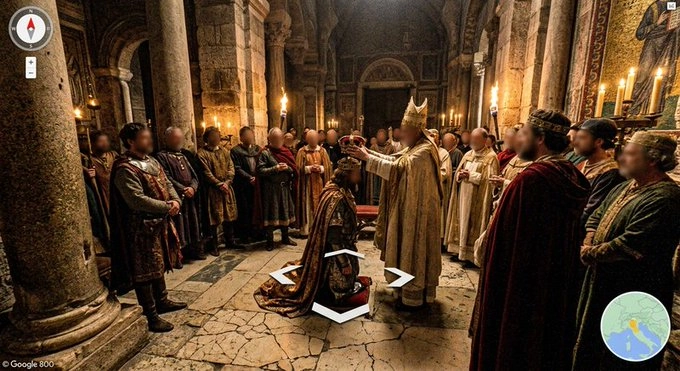
This type of prompt is powerful when you want:
- alternate-history visualizations
- documentary-style re-creations
- museum, education, or explainer visuals
- strong “world logic” before generating motion
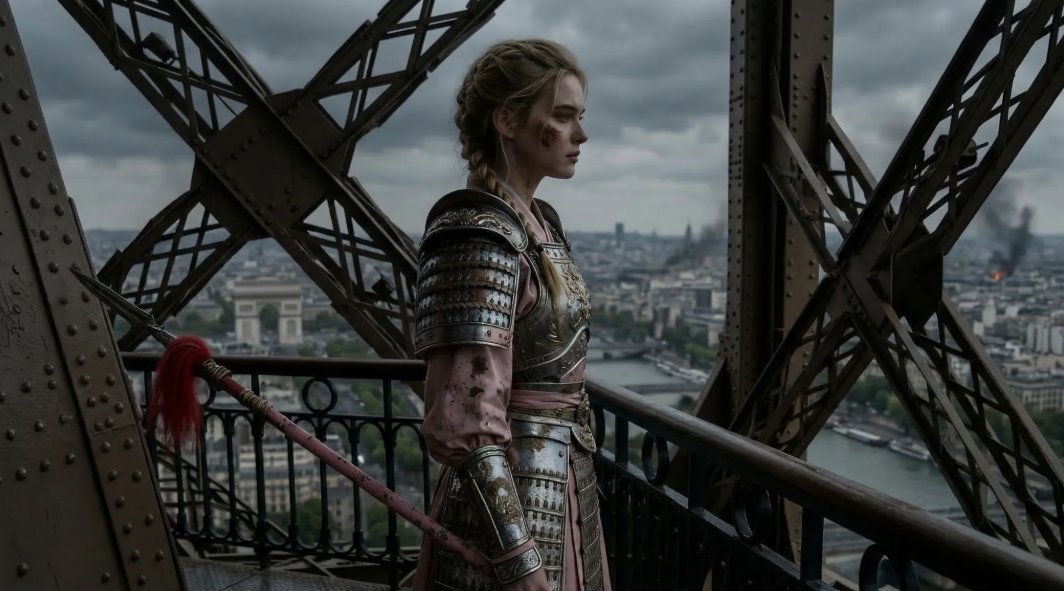
Use Case 3: Real Location Prompting
For AI video, realistic locations are often more valuable than abstract beauty.
When you can generate a believable location frame first, you gain:
- better visual credibility
- better transitions into motion
- more stable environmental continuity
Example from the source article:
Use Case 4: Character Sheets and Three-View References
Three-view image generation is underrated in AI video.
It helps with:
- character consistency
- costume continuity
- scene planning
- reference control for later animation tools
Example:
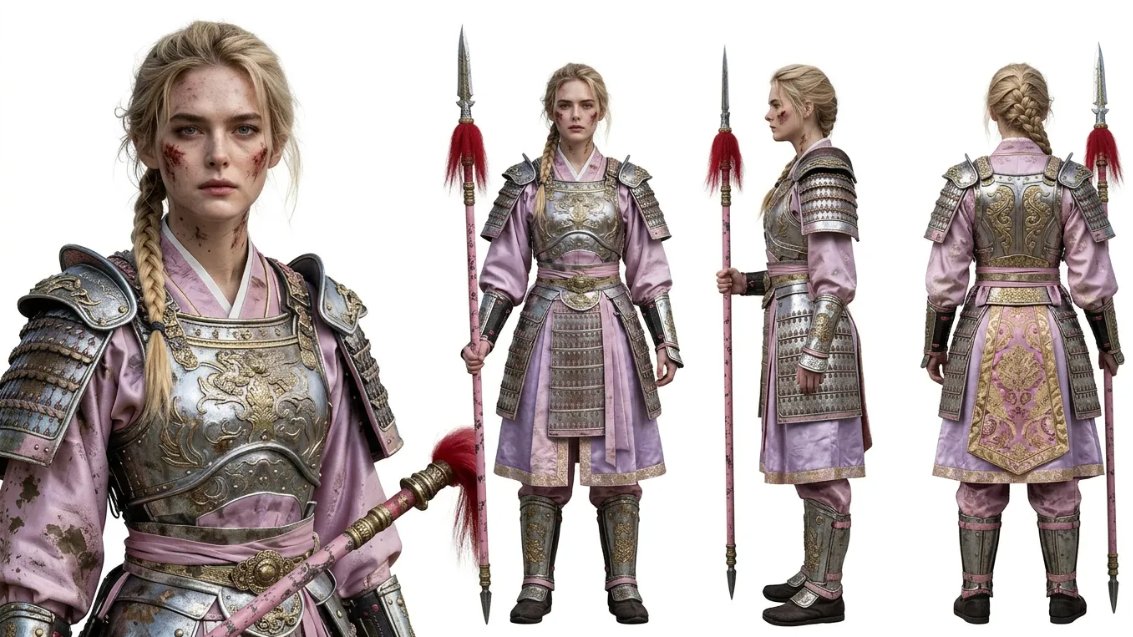
If your AI video workflow depends on a character appearing across multiple shots, this is one of the best prep steps available.
A Better Workflow: From Still Image to Motion
The source article is image-first, but your project is video-first. So the most useful adaptation is turning its advice into a complete still-to-motion workflow.
Recommended Pipeline
- Generate 6 to 20 low-resolution candidate frames with Nano Banana 2
- Select the most usable composition
- Rewrite the prompt with stronger constraints
- Upscale or regenerate the selected candidate at higher quality
- Use the approved image for image-to-video
- Keep motion simple in the video step
This reduces the most common video-generation failures:
- drifting identity
- broken composition
- inconsistent props
- poor scene geometry
- wasted credits on weak starting frames
Example Video Workflow
Below is a simple example of how a still-first workflow can turn into motion content:
And here is another product-oriented demo video from the project assets:
These examples are not copies of the source article. They illustrate the exact workflow lesson behind it: better still images usually produce better AI videos.
Sample Nano Banana 2 Prompts for Different Video Tasks
Prompt 1: Real-Location Keyframe
Cinematic realism, a motorcyclist riding along the Los Angeles coastal highway, medium close-up side view, realistic mountain and ocean details, natural daylight, proportional human anatomy, strong environmental accuracy, sharp focus, suitable as a first frame for image-to-video.Prompt 2: Storyboard Panel Grid
Create a 3x3 cinematic storyboard grid featuring the same woman in red historical clothing across multiple scenes. Keep character identity consistent across all panels. Use varied shot scales including wide shot, medium shot, and close-up. Eastern wuxia aesthetic, soft atmospheric lighting, film-grade composition, continuity-friendly visual design.Prompt 3: Product Keyframe for AI Video
Luxury product commercial style, a slim black laser distance meter held naturally in one hand in a bright kitchen, clean daylight, product shape and proportions consistent with the reference image, realistic hand pose, thin laser beam from the top of the device, minimal background clutter, suitable as a high-fidelity image-to-video source frame.Prompt 4: Historical Reimagination
Hyper-realistic historical reimagination of the crowning of Charlemagne inside Old St. Peter’s Basilica, wide-angle street-view perspective, warm candlelight, dramatic interior shadows, realistic medieval costume detail, immersive documentary style, suitable for cinematic history visualization.Best Workflow for Nano Banana 2 Storyboards and Image-to-Video
If your goal is not just a still image but a working motion asset, this is the highest-leverage sequence:
- Write a narrow prompt for one scene, not an entire film
- Generate several low-cost Nano Banana 2 candidates
- Pick the frame with the strongest composition and world logic
- Add stronger constraints only after you see a promising image
- Upscale or regenerate the winner at higher quality
- Send that approved image into image-to-video with minimal motion instructions
This workflow is also consistent with what works in broader AI video prompt guides: quality usually comes from narrowing the task, not from stuffing every instruction into one giant prompt.
SEO Takeaway: Why This Matters Beyond Prompts
If you are searching for terms like:
- Nano Banana 2 prompts
- Nano Banana 2 guide
- Nano Banana 2 vs Nano Banana Pro
- best image model for AI video
- how to create AI video storyboards
- best first frame workflow for image to video
the real answer is not a single magic prompt.
The real answer is a repeatable workflow:
- use a fast model for ideation
- use structured prompts
- select before upscaling
- protect consistency before motion
- escalate to a more expensive model only when needed
That is the practical value of Nano Banana 2 for AI video creators.
FAQ: Nano Banana 2 for AI Video Creators
Is Nano Banana 2 good for AI video storyboards?
Yes. Nano Banana 2 is especially useful for storyboard grids, keyframes, and first-frame ideation because it lets you test multiple scene directions quickly before committing to video generation.
What are the best Nano Banana 2 prompts?
The best Nano Banana 2 prompts are structured prompts that define style, subject, exact environment, camera angle, lighting, and one or two critical constraints. Prompts work better when they are built for one frame and one decision at a time.
Should I use Nano Banana 2 or Nano Banana Pro?
Start with Nano Banana 2 for ideation, prompt testing, and cheaper storyboard work. Move to Pro when you need more demanding scene fidelity, multi-subject consistency, or harder compositions.
Can Nano Banana 2 be used for image-to-video workflows?
Yes. One of its strongest use cases is generating a clean first frame for image-to-video. When the still image is compositionally strong, the downstream video usually becomes more stable.
What is the best aspect ratio for Nano Banana 2 storyboards?
That depends on the final output. Vertical 9:16 works well for short-form social video, while wide panels and storyboard grids are better for planning narrative beats and ad sequencing.
Related Articles
Final Thoughts
Nano Banana 2 is not just another image generator. For AI video creators, it is a practical planning model.
It helps with:
- storyboards
- keyframes
- first-frame generation
- real-location visualization
- low-cost creative iteration
And when used correctly, it can reduce the number of failed video generations later in the pipeline.
If you want to turn these ideas into actual text-to-video or image-to-video output, you can try them directly in our AI video generator and test a still-first workflow before moving into motion.